Getting started with Blockly
9. Run generated code
Most of your work so far has been in the Edit mode. Now you will update the Play mode to actually execute the custom code associated with each block.
The function handlePlay is already defined in scripts/main.js, but it's empty. Load the workspace content associated with the pressed button:
loadWorkspace(event.target);
Next, you need to generate the code out of that workspace, which you can do with a call to javascript.javascriptGenerator.workspaceToCode.
The user's code will consist of many MusicMaker.queueSound calls. At the end of our generated script, add a call to MusicMaker.play to play all the sounds added to the queue:
let code = javascript.javascriptGenerator.workspaceToCode(
  Blockly.getMainWorkspace(),
);
code += 'MusicMaker.play();';
Finally, execute the script with the eval function. Wrap it in a try/catch so that any runtime errors are logged to the console, instead of failing quietly:
try {
  eval(code);
} catch (error) {
  console.log(error);
}
The full code
The end result should look like this:
function handlePlay(event) {
  loadWorkspace(event.target);
  let code = javascript.javascriptGenerator.workspaceToCode(
    Blockly.getMainWorkspace(),
  );
  code += 'MusicMaker.play();';
  try {
    eval(code);
  } catch (error) {
    console.log(error);
  }
}
A note on eval
Executing scripts with eval is not always the safest option - we use it here for simplicity. If you intend to run the user's blocks in production, check out the JS Interpreter project. This project is separate from Blockly, but was specifically written for Blockly.
Test it
Run the app and try it out! Edit one of the buttons to play a D4 sound 3 times:
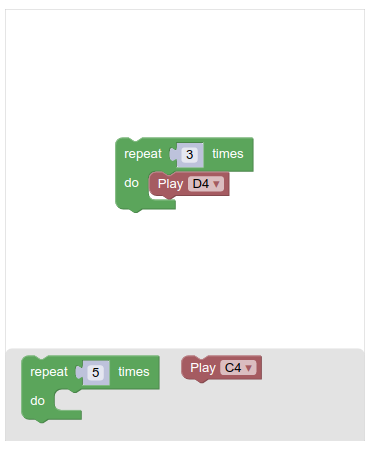
Save and exit the edit mode. Now if you tap this button, you should hear the D4 sound played 3 times.