Getting started with Blockly
8. Generate JavaScript code
Now that each button can be configured with its own Blockly workspace, the next thing we want to do is to generate JavaScript code from each workspace.
This generated code will be run by the browser, effectively executing the blocks set up in the Blockly workspace.
The language generator
Blockly can generate code from blocks for different languages, e.g. JavaScript, Python, or PHP.
A language generator defines the rules for generating a specific language (such as indentation). Because we are using the default imports, we don't need to add any new code to get the JavaScript generator.
As previously mentioned, you can define your imports more carefully to get a different generator.
Add a block generator
When Blockly generates JavaScript code for blocks in a workspace, it translates each block into code. By default, it knows how to translate all library-provided default blocks into JavaScript code. However, for any custom blocks, we need to specify our own translation functions. These are called block generators.
Add the following code to the bottom of scripts/sound_blocks.js:
javascript.javascriptGenerator.forBlock['play_sound'] = function (block) {
  let value = "'" + block.getFieldValue('VALUE') + "'";
  return 'MusicMaker.queueSound(' + value + ');\n';
};
With this translation function, the following play_sound block:
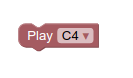
translates into the JavaScript code:
MusicMaker.queueSound('Sounds/c4.m4a');
For more information on block generators, read the generating code page on the developer site.