Block validation and warnings
1. Codelab overview
What you'll learn
This codelab will show you how to ensure that custom blocks either:
- have everything they need to be able to generate valid code, or
- display a visual warning to the user that the block is currently invalid.
What you'll build
In this codelab, you'll create a new custom block type that generates a list of numbers counting up within a given range. The block will validate itself and display a warning if the first number in the range is greater than the last number:
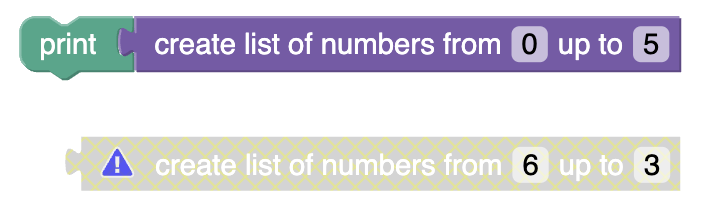
You can find the code for the completed custom block on GitHub.
What you'll need
- A browser.
- A text editor.
- Basic knowledge of JavaScript.
- Basic understanding of the Blockly toolbox.
- Basic understanding of using JSON to define custom blocks.