Build custom renderers
5. Override constants
A ConstantsProvider holds all rendering-related constants. This includes sizing information and colours. Blockly provides a base ConstantsProvider with all required fields set to default values.
The ConstantsProvider constructor() sets all static properties, such as NOTCH_WIDTH and NOTCH_HEIGHT. For a full list of properties, see constants.ts.
Only override the necessary subset of the constants, rather than all of them. To do so:
- Define a constants provider that extends the base
ConstantProvider. - Call the superclass
super()in theconstructor(). - Set individual properties.
Add this above the CustomRenderer definition in src/renderers/custom.js:
class CustomConstantProvider extends Blockly.blockRendering.ConstantProvider {
  constructor() {
    // Set up all of the constants from the base provider.
    super();

    // Override a few properties.
    /**
     * The width of the notch used for previous and next connections.
     * @type {number}
     * @override
     */
    this.NOTCH_WIDTH = 20;

    /**
     * The height of the notch used for previous and next connections.
     * @type {number}
     * @override
     */
    this.NOTCH_HEIGHT = 10;

    /**
     * Rounded corner radius.
     * @type {number}
     * @override
     */
    this.CORNER_RADIUS = 2;

    /**
     * The height of the puzzle tab used for input and output connections.
     * @type {number}
     * @override
     */
    this.TAB_HEIGHT = 8;
  }
}
To use the new CustomConstantProvider, override makeConstants_() inside the CustomRenderer class. Below the constructor(), add:
  /**
   * @override
   */
  makeConstants_() {
    return new CustomConstantProvider();
  }
The result
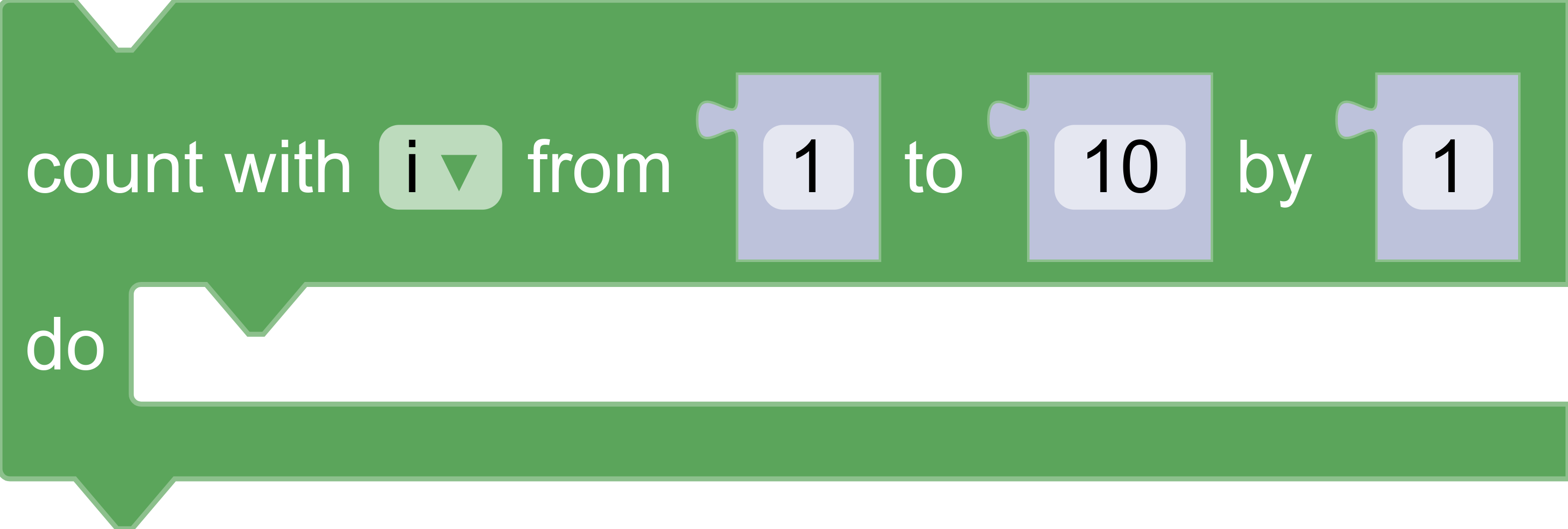
Return to the browser, click on the Loops entry, and drag out a repeat block. The resulting block should have triangular previous and next connections, and skinny input and output connections. Note that the general shapes of the connections have not changed--only parameters such as width and height.