Plugins
A plugin is a self-contained piece of code that adds functionality to Blockly. For example, it might add a custom field, define a new theme, or provide a custom renderer. Plugins are generally packaged and distributed through npm.
The BlocklyOptions
object
has a plugins property for injecting classes that customize Blockly
behavior. While these classes may
be implemented as plugins, this is not required and they are otherwise
unrelated.
For a quick introduction to plugins, see our Plugins Overview talk (2021).
If you want to create your own plugin, see Add a plugin.
First- and third-party plugins
First-party plugins are supported by the Blockly team and published under the
@blockly scope on npm. They are designed to be usable in a wide range of
Blockly applications.
Third-party plugins are maintained and published independently. They may be more complex, more experimental, or targeted to a narrower range of Blockly applications.
Find a plugin
-
Visit Blockly Plugins & Demos, which has live demos of first-party plugins.
-
Search npm for
keyword:blockly-plugin. Plugins with the scope@blocklyare published by the Blockly team. For broader results, search forkeyword:blocklyorblockly. -
See the
blockly-samples/pluginsdirectory on GitHub, which is the repository for first-party plugins. Each plugin has a README that describes its behaviour and intended use.
Install a plugin
We recommend installing plugins with a package manager like npm or yarn. This makes it easy to receive updates.
-
Install a plugin with a package manager
- npm
- yarn
npm install @blockly/field-angleyarn add @blockly/field-angle -
Install a plugin without a package manager
- unpkg
<script src="https://unpkg.com/@blockly/field-angle"></script>You can also clone the GitHub repository that contains the plugin. For first-party plugins, this is
blockly-samples.
Check the plugin's README to see if there are any additional installation instructions.
Use a plugin
Each plugin is different, so see the plugin's README for information on how to
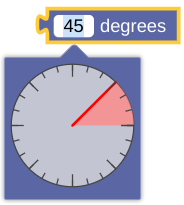
use that plugin. The following example shows how to use the
@blockly/field-angle
plugin:
-
Import code from the plugin. How you do this depends on how you installed the plugin.
- npm or yarn
- unpkg
- Cloned repository
import Blockly from 'blockly';
import {registerFieldAngle} from '@blockly/field-angle';
You do not need to use an
importstatement.import {registerFieldAngle} from 'path/to/plugin'; -
Initialize the plugin as needed. Plugins that provide custom fields often require you to register the field:
registerFieldAngle(); -
Use the plugin.
Blockly.common.defineBlocksWithJsonArray([
  {
    type: "my_angle_block",
    message0: "%1 degrees",
    args0: [
      {
        // Use @blockly/field-angle.
        type: "field_angle",
        name: "FIELDNAME",
        value: 45,
      },
    ],
    output: null,
    style: 'math_blocks'
  },
]);
Plugin versions
Plugins in blockly-samples use semantic versioning,
which requires breaking changes to use a new major version. Any new plugin that
monkey patches core will have a major version of 0 to signify initial
development.
Most plugins include the blockly package as a
peerDependency
rather than a dependency. This is because we assume that you have already
installed Blockly. (It doesn't make sense to use a plugin without using
Blockly.) This lets you manage the Blockly version yourself, but also requires
you to check the plugin's package.json to determine the minimum version of
Blockly it requires. If a plugin is updated to need a newer version of Blockly,
this is considered a breaking change and its major version will be increased.
When you add a plugin to your application's package.json, the default is to
include a caret before the version:
"dependencies": {
  "@blockly/field-angle": "^5.0.12"
}
This will let npm install any minor version at or above the listed version, so
version 5.0.20 or 5.1.0 works, but a new major version such as 6.0.1 does
not. When you update to a new version of Blockly, it's a good idea to check if
any of your plugins can be updated to a new major version as well.