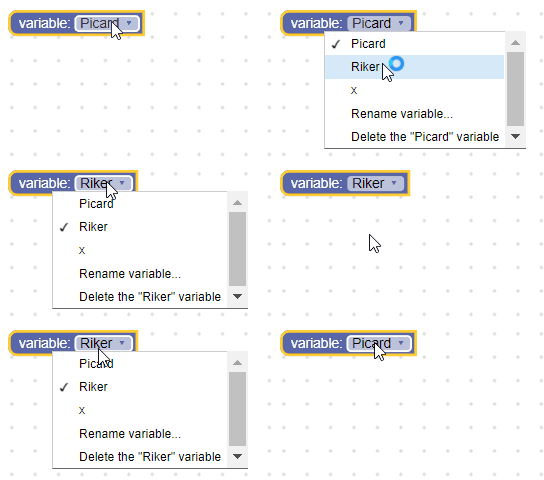
Variable fields
A variable field stores a string as its value, and a string as its text. The value is an ID of a variable, while the text is the name of a variable.
Variable field

Variable field with editor open

Variable field on collapsed block

Creation
Untyped
- JSON
- JavaScript
{
  "type": "example_variable_untyped",
  "message0": "variable: %1",
  "args0": [
    {
      "type": "field_variable",
      "name": "FIELDNAME",
      "variable": "x"
    }
  ]
}
Blockly.Blocks['example_variable_untyped'] = {
  init: function() {
    this.appendDummyInput()
        .appendField('variable:')
        .appendField(new Blockly.FieldVariable('x'), 'FIELDNAME');
  }
};
Typed
- JSON
- JavaScript
{
  "type": "example_variable_typed",
  "message0": "variable: %1",
  "args0": [
    {
      "type": "field_variable",
      "name": "FIELDNAME",
      "variable": "x",
      "variableTypes": ["Number", "String"],
      "defaultType": "Number"
    }
  ]
}
Blockly.Blocks['example_variable_typed'] = {
  init: function() {
    this.appendDummyInput()
      .appendField('variable:')
      .appendField(new Blockly.FieldVariable(
          'X',
          null,
          ['Number', 'String'],
          'Number'
      ), 'FIELDNAME');
  }
};
The variable constructor takes in an optional variable name, an optional validator, an optional array of variable types, and an optional default type.
- The variable name should be a string. This will be the name of the initial variable the field holds. If it is null or undefined a unique name will be generated.
- The variable types should be an array of strings. This tells the field what types of variables the field can hold (i.e. what types of variables to add to the dropdown). If it is null or undefined, all variable types will be accepted (and added to the dropdown).
- The default type should be a string. This will be used when creating the field's initial variable model. If this is defined, its should be included in the variable types array. If it is null or undefined this value defaults to an empty string, meaning the initial variable will be flexibly typed.
→ For more information on strict typing, see Type Checks.
Serialization
- JSON
- XML
The JSON for a variable field looks like so:
{
  "fields": {
    "FIELDNAME": {
      "id": "QJD^+@[RVIwbLSZoDb:V"
    }
  }
}
Where FIELDNAME is a string referencing a variable field, and
the value is the ID of the variable the field references.
If you are using this field in the toolbox, you can also specify the name and (optional) type directly, since there will be no variable available to reference.
{
  "fields": {
    "FIELDNAME": {
      "name": "my_variable",
      "type": "string"
    }
  }
}
The XML for a variable field looks like so:
<field name="VARIABLE" id="QJD^+@[RVIwbLSZoDb:V" variabletype="">name</field>
- The node's
nameattribute contains a string referencing a variable field. - The node's
idattribute contains the ID of the variable the field references. - The node's
variabletypeattribute contains the type of the variable. Thevariabletypefollows the same rules as the constructor's default type parameter. - The node's inner text is the name of the variable. The inner text value follows the same rules as the constructor's variable name parameter.
Creating a variable validator
For information on validators in general see Validators.
A variable field's value is a string, so any validators must accept a string and
return a string, null, or undefined.
Here's an example of a validator that only accepts some predefined variables as
options. These variables would need to be defined with the
Workspace.getVariableMap().createVariable
function when the workspace is loaded.
function(newValue) {
  var validIds = ['Worf', 'Riker', 'Picard'];
  if (validIds.indexOf(newValue) == -1) {
    return null;
  }
  return newValue;
}